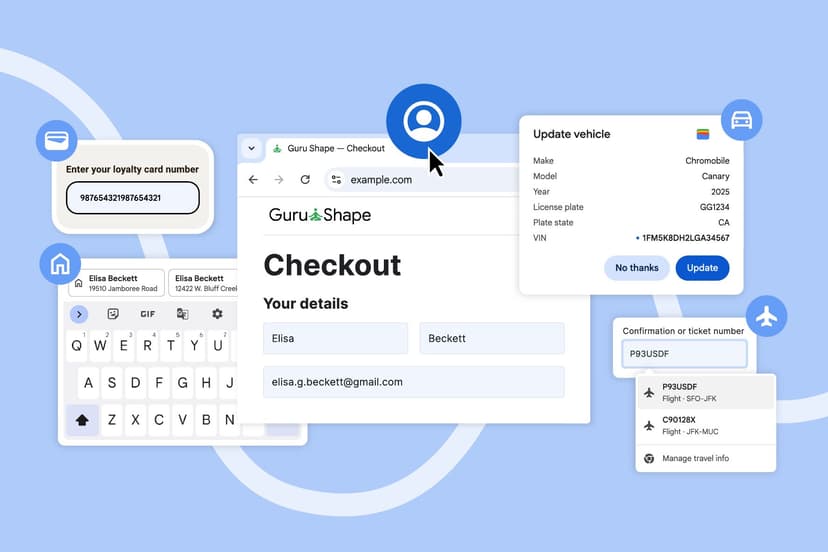
Google just rolled out four major Chrome autofill upgrades that could change how you shop and travel online. The browser now pulls loyalty card numbers and flight details directly from Google Wallet, while Android users get clearer two-line autofill suggestions. These aren't just convenience tweaks - they're strategic moves to deepen Chrome's integration with Google's ecosystem during the crucial holiday shopping season.
Google is making a play for your holiday shopping habits with Chrome's biggest autofill overhaul in years. The company quietly rolled out four major improvements today that turn the browser into a more powerful shopping and travel assistant, pulling data seamlessly from your Google Account and Wallet.
The centerpiece feature connects Chrome directly to Google Wallet, letting users autofill loyalty card numbers without digging through physical cards or apps. "Chrome recognizes the form then pulls in the necessary flight information — like the confirmation number and dates — from your booking saved in Google Wallet," explains Ali Sarraf, Senior Product Manager for Chrome, in the company's announcement.
This isn't just about convenience. Google's timing is strategic - launching during peak holiday shopping when consumers are juggling multiple retailers, each demanding loyalty numbers for rewards programs. The integration works on both desktop and Android, though users need to enable "enhanced autofill" in Chrome settings to access the smart features.
The Google Account integration goes deeper than previous versions. For signed-in users, Chrome now automatically pulls names, email addresses, and saved home and work addresses directly from your Google profile. This creates what Google calls a "smooth handoff" that "removes all the hassle from your first interaction with any new website." The feature launches across desktop, Android, and iOS today.
But the most significant change might be on mobile. Chrome for Android now displays autofill suggestions in a two-line format instead of the previous condensed view. This expanded display shows more context about each saved item - whether it's a password, address, or payment method - reducing the frustration of accidentally selecting wrong information on small screens.
Android users have long complained about Chrome's cramped autofill interface compared to dedicated password managers. This update directly addresses those concerns while keeping users within Google's ecosystem rather than pushing them toward third-party solutions.
The global address improvements reveal Google's broader ambitions. The company added support for "between streets" descriptions common in Mexico and teased upcoming phonetic name support for Japan. These localization efforts suggest Chrome is positioning itself as the default browser for international commerce, not just U.S.-based shopping.
For Google, this update serves multiple strategic purposes. It deepens Chrome's integration with other Google services, making it harder for users to switch browsers. The Wallet integration also drives adoption of Google's payment platform, creating a closed loop where users shop, pay, and earn rewards all within Google's ecosystem.
The timing coincides with increased competition from Apple Safari's enhanced autofill features and password management improvements. While Safari focuses on privacy-first autofill, Google's approach emphasizes convenience through cross-service integration.
Early testing suggests the loyalty card feature works smoothly with major retailers, though some smaller chains may need form updates to recognize Chrome's autofill patterns. The flight information integration appears limited to bookings saved in Google Wallet, potentially excluding reservations made through other platforms.
The enhanced autofill features require users to enable the setting manually, which could limit adoption among privacy-conscious users. Google frames this as giving users control, but it also means the full benefits won't reach all Chrome users automatically.
Industry analysts see this as Google's response to the rise of specialized shopping assistants and browser extensions that help users track deals and apply coupons. By building these features directly into Chrome, Google bypasses third-party solutions while collecting valuable shopping behavior data.
Google's Chrome autofill overhaul represents more than feature improvements - it's a strategic play to lock users deeper into the Google ecosystem during peak shopping season. While the convenience benefits are real, the move also positions Google to capture more shopping behavior data and compete directly with specialized shopping tools. The success will depend on user adoption of the enhanced autofill settings and how well the integrations work across diverse shopping sites. For now, Chrome users get genuinely useful upgrades that could save significant time during holiday shopping and travel booking.